| On This Page 1. Why Database-per-Tenant Breaks Down at Scale 2. What Is Database-per-Tenant? 3. The Five Hard Problems at 10,000 Databases 4. Architecture for Managing a Database Fleet 5. Best Practices and Automation 6. How to Build It: Steps, Stack, Cost, When to Choose It 7. Real Case Study: Data Infrastructure at Scale 8. FAQs |
Giving every customer their own database sounds clean until you wake up responsible for ten thousand of them, each needing migrations, backups, and monitoring. How do you run that without losing your mind?
At Acquaint Softtech, team help SaaS companies operate large database fleets without the chaos. Our hired DevOps engineers treat a fleet of databases as one system to automate, not ten thousand to babysit.
The trouble is that everything easy with one database, a schema change, a backup, a restore, becomes a logistics problem multiplied by ten thousand. At that scale, recovery stops being a checkbox: the US government’s NIST contingency-planning guidance treats recoverability, with defined recovery objectives, as a core requirement, not an afterthought. One unscripted migration can take down hundreds of tenants at once.
This guide covers what database-per-tenant is, the hard problems at scale, the architecture that tames them, cost, and a real case study. It pairs with our wider SaaS product development guide. Read on, then run a thousand databases like one.
Why Database-per-Tenant Breaks Down at Scale
Database-per-tenant is wonderful at ten tenants and brutal at ten thousand. The isolation that makes it attractive also multiplies every routine task, so the model does not fail on correctness; it fails on operations. Designing for that operational reality from the start is a software product development decision, not a problem to discover in production.
What actually breaks first?
Usually migrations and connections. A schema change that takes seconds on one database becomes a fragile, hours-long campaign across thousands, and naive per-tenant connection pools exhaust the database server long before you reach real scale. Spotting these limits before they bite is a virtual CTO services strength.
Why does the pain arrive suddenly?
Manual processes that felt fine at a hundred databases quietly cross a threshold where no human can keep up, and the team that was coping is suddenly firefighting. Adding the engineering capacity to build proper fleet tooling before that point is where IT staff augmentation services help.
Is database-per-tenant overkill for most SaaS?
For many products, yes. A shared database with a tenant identifier on every row carries thousands of small tenants more cheaply and with far less operational weight, and it is the right default for most early-stage SaaS.
Database-per-tenant earns its complexity when isolation is a contractual or regulatory requirement, when tenants are large enough that noisy neighbors are a real risk, or when customers expect to take their entire database with them. The honest answer for most teams is to start pooled and reserve dedicated databases for the customers who genuinely need them.
What Is Database-per-Tenant?
Database-per-tenant is the isolation model in which every customer gets their own dedicated database rather than sharing tables with others. It gives the hardest isolation possible, since one tenant’s data physically lives apart from the rest, which is why regulated and enterprise customers often demand it. Even a multi-site product built by hiring WordPress developers sometimes uses a separate database per site for exactly this reason.
What are the benefits?
Beyond strong isolation, each tenant gets clean per-customer backups and restores, independent performance, easy per-tenant customization, and a simple story for deleting or exporting one customer’s data. A multi-store platform built by hired WooCommerce developers can hand a departing merchant their entire database without untangling shared tables.
What are the trade-offs and 2026 trends?
The cost is operational complexity that grows with every tenant, which is why many teams reserve the model for large or regulated customers and pool the rest. The 2026 shift is serverless Postgres and cell-based architectures, making large fleets cheaper to run. Owning that fleet tooling over time suits a dedicated software development team.
The Five Hard Problems at 10,000 Databases
At scale, five problems hurt the most: migrations, connections, backups and recovery, monitoring, and cost. Each is trivial for one database and treacherous for thousands. The orchestration that tames them is frequently built by hired Python developers who script the fleet.
| Problem | Why it hurts at scale | How to tame it |
| Migrations | One schema change must run across every database | Batched, versioned, idempotent migration runner |
| Connections | Per-tenant pools exhaust the database server | A connection proxy such as PgBouncer |
| Backups and recovery | Thousands of backups and untested restores | Centralized, automated, regularly drilled restores |
| Monitoring | Knowing which of the 10,000 is slow or down | Aggregate metrics with per-tenant drill-down |
| Cost | An instance per tenant is ruinous | Pack many databases onto fewer servers |
How do you run a migration across every tenant?
Not all at once. A fleet migration runs in controlled batches with health checks between them, applies each change idempotently so a retry is safe, tracks per-tenant migration state, and can pause or roll back the moment failures spike. Building that runner is often work for hire Laravel developers using the framework’s migration tooling.
How do you avoid running out of connections?
You stop opening a pool per tenant and route everything through a connection proxy that multiplexes many databases over a bounded set of real connections. The application keeps a tenant-to-database map and asks the proxy for the right one. Implementing that routing layer suits Django developers as readily as any backend team.
What happens when a tenant leaves?
Deprovisioning matters as much as provisioning, and it is easy to neglect. When a customer cancels, their database should be exported if they want a copy, retained for whatever your contract and regulations require, then archived, and finally destroyed on a schedule, with the catalog updated at each step.
Well, this is one of database-per-tenant’s quiet advantages: handing over or deleting a single customer’s data is a clean, contained operation rather than a risky surgical extraction from shared tables. Done badly, orphaned databases pile up, quietly consuming storage and widening your backup and compliance surface.
Architecture for Managing a Database Fleet
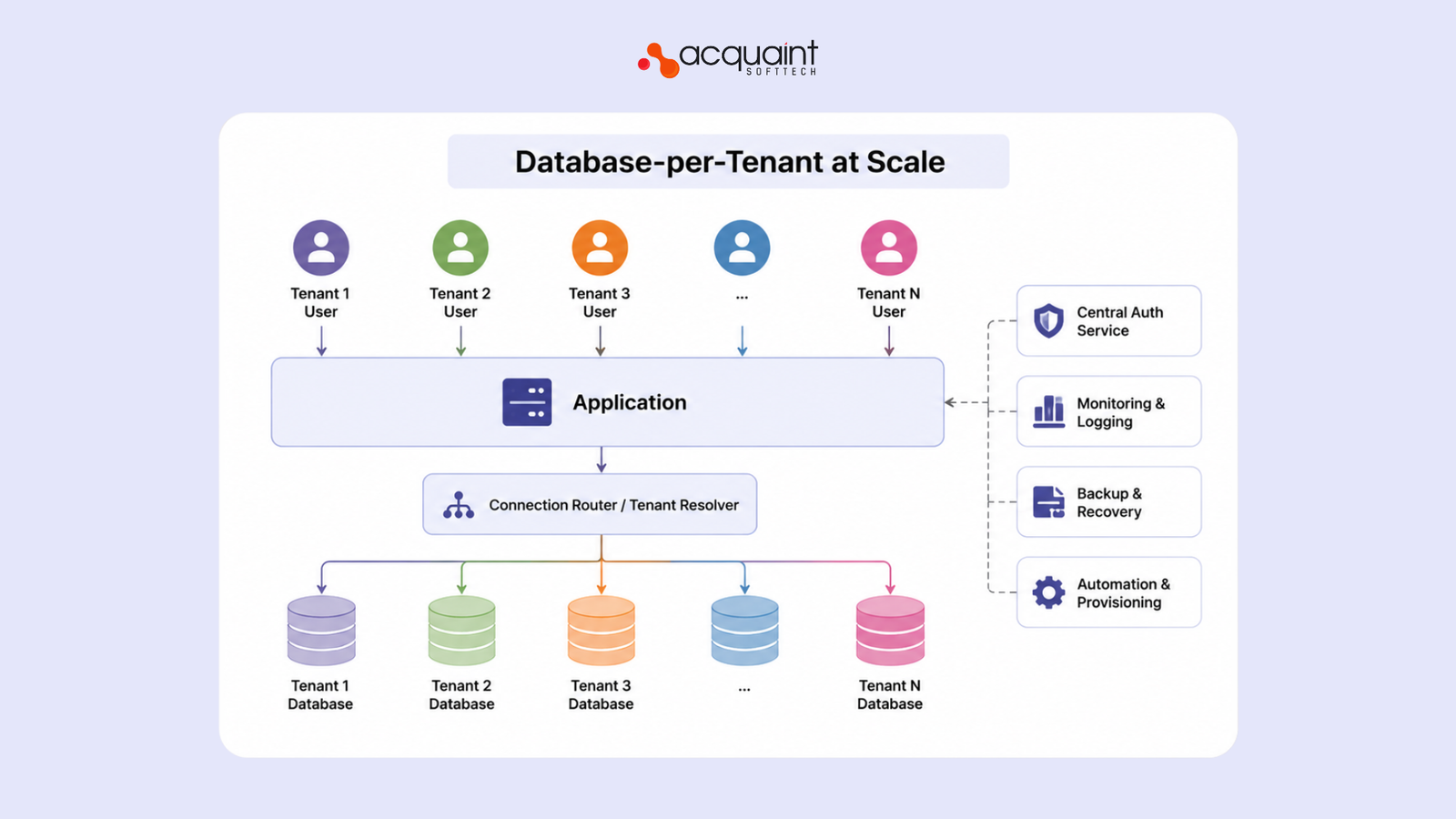
A manageable fleet has four pillars: a central catalog that maps each tenant to its database, a connection proxy, many databases packed onto shared servers, and a migration runner that treats the fleet as one system. Get those right, and ten thousand databases behave like a single, scriptable estate. The application layer that talks to the catalog is often built by hired MERN stack developers.
What is the tenant catalog, and why is it the heart of the system?
The catalog is a small, central database that records every tenant and where its database lives, which server, which schema version, and what status. Every request consults it to route to the right place, and every provisioning or migration job updates it. Building this reliably suits MEAN stack developers.
How do you keep the whole fleet on the same schema?
You version every tenant’s schema in the catalog and roll changes forward in waves, so the fleet is briefly mixed-version by design, and the application tolerates both during a rollout. Treating each wave as a planned release rather than a risky big-bang is a software version upgrade services mindset applied across thousands of databases.
How do you handle a single hot tenant?
One advantage of the model is that a demanding tenant is contained: their load hits their own database, not everyone else’s. The lever you have is placement. When the catalog and monitoring show a tenant outgrowing the server it shares with hundreds of others, you move that database to a quieter or larger instance, or give it a server of its own, and update the catalog so routing follows. Planning this rebalancing, with headroom on each server and a tested move procedure, turns a potential 2 a.m. emergency into a routine, scheduled operation.
Read Also: How Blockchain Improves Transparency in Digital Systems
Best Practices and Automation
The golden rule is to treat databases as cattle, not pets: nothing is touched by hand, everything is provisioned, migrated, backed up, and monitored by automation. A fleet you operate manually will eventually operate you. Anomaly detection that flags the one misbehaving tenant among thousands is a natural fit for AI development services.
What are the best practices?
• Automate provisioning, migrations, backups, and teardown end-to-end.
• Keep a single source-of-truth catalog of every tenant database.
• Run migrations in batches with health checks and rollback.
• Route through a connection proxy instead of per-tenant pools.
• Test restores regularly, not just backups.
• Monitor in aggregate with per-tenant drill-down and alerting.
Where does AI help at fleet scale?
Across thousands of databases, the signal you need is usually which one is drifting, a slow query, a creeping disk, an unusual error rate, before it becomes an incident. Models that surface those outliers automatically are built by AI/ML engineers.
How do you keep a fleet healthy over time?
Fleet tooling is never finished: database versions change, tenants grow at different rates, and hot tenants need rebalancing onto quieter servers. Keeping the automation, backups, and capacity plan current is a software support and maintenance services commitment.
How to Build It: Steps, Stack, Cost, When to Choose It
Building fleet management follows a clear order: stand up the catalog, automate provisioning, add the connection proxy, build the migration runner, then centralize backups and monitoring. The value is operating thousands of databases with a small team. Delivering this affordably is core software development outsourcing work.
How do you build it, step by step?
This is the order we follow on real builds:
1. Build the tenant catalog as the single source of truth.
2. Automate database provisioning and teardown.
3. Route connections through a proxy, not per-tenant pools.
4. Build a batched, idempotent, resumable migration runner.
5. Centralize backups and rehearse per-tenant restores.
6. Add aggregate monitoring with per-tenant drill-down.
7. Pack databases onto shared servers and plan rebalancing.
Should you even choose database-per-tenant?
Choose it for strong isolation, heavy compliance, or large enterprise tenants, and pool the long tail of small tenants in a shared database instead, a hybrid most mature platforms land on. Deciding that a split is exactly what a product discovery workshop can settle early.
Can you move from a shared database to a per-tenant database later?
Yes, and many teams do exactly that as they grow into enterprise customers. The migration extracts one tenant’s rows from the shared tables into a fresh dedicated database, repoints the catalog, and cuts that tenant over, ideally with a brief read-only window to keep data consistent.
Because it runs one tenant at a time, the move can be gradual and low-risk: promote the customers who need isolation first, leave the rest pooled, and end up with the hybrid most large platforms run. The work is real, but it is a controlled, repeatable procedure rather than a single dangerous rewrite.
How much does it cost, and what stack is best?
Most of the cost is the automation: catalog, provisioning, migration runner, and monitoring, which is a few weeks for the basics and more for a full fleet platform, with India-based teams delivering at up to 40% lower cost.
A common stack is PostgreSQL, PgBouncer for pooling, framework migrations driven by a fleet runner, and Prometheus and Grafana for monitoring; a mobile client built by React Native developers routes through the same catalog as the web app.
| Layer | Recommended Tech | Role |
| Databases | PostgreSQL, one per tenant | Strong per-tenant isolation |
| Connections | PgBouncer or a proxy | Bound real connections across the fleet |
| Catalog | A central registry database | Map tenants to databases and versions |
| Migrations | Framework migrations + fleet runner | Roll schema changes in safe waves |
| Monitoring | Prometheus + Grafana | Aggregate health with per-tenant detail |
Real Case Study: Data Infrastructure at Scale
Operating data infrastructure at scale is the discipline behind any large database estate. Ailleron, a Krakow banking-technology firm and a software partner to some of the world’s most digitally mature banks, had its data scattered across five source systems, spreadsheets, and databases.
This was a data-warehouse consolidation rather than a multi-tenant database fleet, but it shows the same discipline a 10,000-database estate demands: automate the manual work and operate data infrastructure reliably at scale. Steering a build this central on milestones is where a technical project manager keeps risk under control.
| Before • Five disconnected source systems, plus spreadsheets and separate databases, with no single source of truth. • The quarterly board report took four days to assemble. • Analysts spent the equivalent of roughly 200 hours a week gathering and cleaning data by hand. |
↓
| After • One centralized, cloud-based data warehouse refreshed every few hours, feeding three live dashboards. • The same report now finishes in a single day. • Roughly 200 analyst hours a week were freed for real analysis instead of manual data wrangling. |
Within the first quarter of using the new dashboards, leadership identified five areas where operational spending was out of line with client revenue. More builds sit on our case studies page. Teams operating data and database infrastructure at this scale often hire remote developers with data-engineering and DevOps experience to keep it reliable as it grows.
| Verified client review (Clutch, rated 5.0/5.0): Rafal Styczen, Chairman and Founder of Ailleron, said the team did not just meet deadlines but showed real commitment to their success, and praised their ability to bridge deep technical work and business needs. Acquaint Softtech holds a 4.9/5 rating from 50+ Clutch reviews with Premier Verified status. |
FAQs
What is database-per-tenant?
Database-per-tenant is a multi-tenant SaaS model where each customer gets a dedicated database. It provides strong data isolation and security. This approach is common in enterprise SaaS applications.
What are the benefits of database-per-tenant?
It offers strong security, separate backups, and independent performance. Each tenant’s data can be managed individually. Customization and compliance requirements are also easier to support.
What features does database-per-tenant need at scale?
Large-scale deployments need automated provisioning and tenant management. Centralized monitoring, backups, and migration tools are essential. A tenant catalog helps track all databases efficiently.
How do you run migrations across thousands of databases?
Migrations should run in controlled batches with health checks. Each database update must be tracked and monitored. Failed migrations should be paused or rolled back automatically.
How much does a database-per-tenant cost to build?
| Solution Type | Cost (USD) |
| Basic Database-per-Tenant Setup | $15,000 – $35,000 |
| Scalable Multi-Tenant Platform | $35,000 – $75,000 |
| Enterprise Tenant Management System | $75,000+ |
When should you choose database-per-tenant over a shared database?
Choose database-per-tenant when security, compliance, or enterprise requirements are critical. It is ideal for customers needing dedicated resources. Smaller tenants often fit better in a shared database model.
What tech stack is best for database-per-tenant?
PostgreSQL is a popular database choice for this model. PgBouncer helps manage database connections efficiently. Monitoring tools like Prometheus and Grafana support large-scale operations.
Why is database-per-tenant important for SaaS?
Database-per-tenant improves data isolation and customer trust. It simplifies compliance and tenant-specific management. Many enterprise SaaS platforms use this approach for high-value customers.
Can database-per-tenant improve SaaS security?
Yes, separate databases reduce the risk of cross-tenant data exposure. Security policies can be applied individually to each tenant. This provides stronger protection than many shared models.
What is the best multi-tenant database strategy?
A hybrid approach is often the best solution. Enterprise customers can use dedicated databases, while smaller customers share infrastructure. This balances security, scalability, and cost efficiency.